
Paper Trading Crypto: The Complete Walkthrough Guide (2026)
Learn how to paper trade crypto — from Bitcoin and meme coins to futures — without risking real money. Step-by-step guide with setup, strategies, and common mistakes to avoid.
TL;DR
A complete walkthrough for crypto paper trading on Gainium. Covers setup, Bitcoin paper trading, meme coin paper trading, futures simulation, bot testing (Grid, DCA, Combo), backtesting vs paper trading, and when to go live — all without risking real money.
Most traders skip straight from backtest to live and wonder why they lose money. The missing step is paper trading — and it matters more than most people think.
This guide walks you through everything: setting up paper trading on Gainium, testing different assets (Bitcoin, meme coins, altcoins), simulating futures, using trading bots, and knowing when you're actually ready to go live.
No fluff, no theory-only advice. Just the steps.
What Is Crypto Paper Trading?#
Paper trading is simulated trading with real market data but virtual money. Your orders never touch a real exchange. Prices are real, movements are real — but your balance is simulated.
Think of it like a flight simulator. Pilots don't jump into a 747 on day one. They practice in a simulator that mirrors real conditions. Paper trading is that simulator for your money.
On Gainium, paper trading is free — every plan includes it, including the free tier. You can run unlimited paper bots alongside your real ones, test new settings, or just learn how the platform works without any financial pressure. For a quick-reference overview of the feature, see our paper trading help article.
How to Set Up Paper Trading on Gainium#
Setup takes about 30 seconds:
Step 1: Switch to Paper Mode#
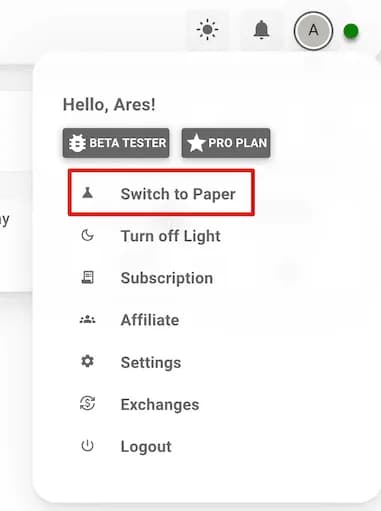
Go to your account menu in the top bar. You'll see a toggle to switch between Live and Paper mode. Click it to switch to Paper.
Step 2: Add a Paper Exchange#
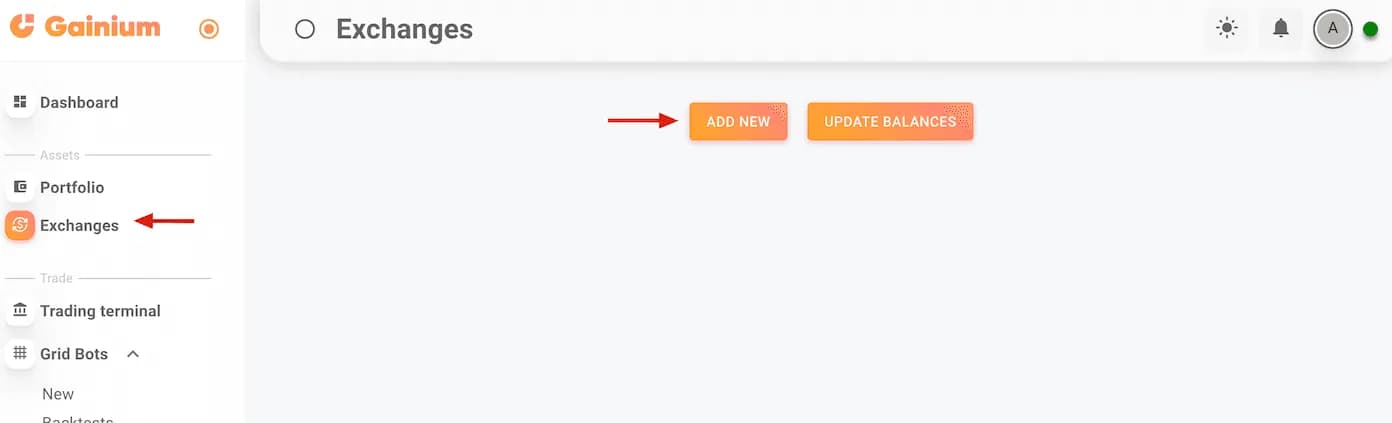
Go to Exchanges, click Add Exchange, and select Paper Trading. Choose which exchange you want to simulate — Binance, Bybit, KuCoin, OKX, or Coinbase. You can create as many paper exchanges as you need.
Step 3: Set Your Virtual Balance#
Set a realistic starting balance. If you'd trade with $500 in real life, use $500 here. Paper trading with $100,000 when you have $500 to invest won't teach you anything useful. Match your actual situation.
That's it. Now you create bots and place trades exactly the same way you would in live mode. Same settings, same interface, same everything. The only difference: no real money moves.
Bitcoin Paper Trading#
Bitcoin is the most liquid crypto asset, which makes it ideal for paper trading practice. Here's how to approach it:
For manual trading: Use Gainium's TradingView charts to practice entries and exits on BTC pairs. Track your trades in the Trade Journal to build a record of what works.
For bot trading: Set up a Grid bot or DCA bot on a BTC/USDT pair. Bitcoin's price movements give you clean data to evaluate whether your bot settings actually work across different market conditions.
For futures practice: Paper trade BTC perpetual futures with leverage. Gainium simulates liquidation prices, so you can see exactly where you'd get wiped out — without actually losing anything. This is critical for understanding leverage risk before going live.
Why start with Bitcoin? BTC has deep liquidity on every exchange, tight spreads, and consistent volatility. It's the most realistic paper trading experience you can get because the gap between simulated and real execution is smallest on high-liquidity pairs.
Meme Coin Paper Trading#
Meme coins — DOGE, SHIB, PEPE, WIF, BONK, FLOKI, and whatever the market launches next — are where paper trading becomes essential rather than optional.
Here's why: meme coins are volatile, often illiquid, and driven by social sentiment rather than fundamentals. The margin for error is razor-thin. Paper trading lets you experience that volatility without paying for the education with real money.
What to Practice#
- Grid bots on meme coins: Meme coins often trade in wide ranges. A Grid bot can capture those swings, but you need to get the range and grid spacing right. Paper trade it first to see if your settings survive the volatility.
- DCA strategies: Dollar-cost averaging into meme coins during dips sounds simple, but the safety order distances that work for BTC won't work for a coin that can drop 40% in a day. Paper trading reveals this fast.
- Entry/exit timing: Practice spotting momentum shifts. Replay historical meme coin charts, then paper trade forward to test your read.
The Liquidity Warning#
This is where paper trading's biggest limitation hits hardest. Paper orders fill instantly at the triggered price. On a meme coin with thin order books, your real orders might not fill at all — or they'll fill at a much worse price. Keep this in mind when evaluating your paper results on low-cap tokens.
Paper Trading Futures (With Liquidation Simulation)#
Futures paper trading on Gainium includes full leverage simulation and liquidation tracking. This is one of the most valuable features for anyone considering leveraged trading.
What You Can Test#
- Leverage levels: See the real impact of 2x, 5x, 10x, or 20x leverage on your PnL and liquidation price
- Position sizing: Understand how position size relative to your balance affects your risk
- Funding rates: Get familiar with how perpetual futures funding works
- Stop-loss placement: Test where to place stops to avoid liquidation while giving trades room to breathe
Supported Exchanges for Futures Paper Trading#
- Binance Futures
- Bybit Futures
- KuCoin Futures
- OKX Futures
A Practical Exercise#
Set up a BTC/USDT perpetual futures paper trade at 10x leverage. Watch how quickly your liquidation price approaches the current price. Then try the same trade at 3x. The difference is visceral — and far better learned with fake money than real.
What Can You Paper Trade on Gainium?#
Everything. Every feature available in live mode works identically in paper mode:
- Grid Bots — Test grid ranges and spacing without worrying about getting caught in a downtrend
- DCA Bots — Validate safety order distances and take-profit levels
- Combo Bots — Our most advanced bot type, combining grid and DCA. Paper trading is the perfect place to learn how these work
- Manual Trading — Practice entries and exits with real charts and real prices
- Futures — Including liquidation simulation, so you can see exactly where you'd get liquidated
- TradingView Webhooks — Connect a TradingView strategy via webhooks and paper trade it on Gainium
You also get full access to TradingView charts, indicators, and — this is important — advanced metrics and reporting. You can analyze your paper results properly, not just eyeball them.
Backtesting vs Paper Trading: Use Both#
These are complementary tools, not alternatives. Here's the difference:
| Backtesting | Paper Trading | |
|---|---|---|
| Data | Historical | Real-time |
| Speed | Months of data in seconds | Runs in real time |
| Purpose | Eliminate bad ideas quickly | Validate ideas in current conditions |
| Emotional factor | None | Low (but more than backtest) |
| Best for | Parameter optimization | Forward validation |
The Recommended Workflow#
For mechanical strategies (Grid, DCA bots):
- Backtest → Use Gainium's backtester to test settings against historical data
- Paper trade → Run the bot forward in real time for 2-4 weeks
- Go live small → Start with minimum position size
For technical strategies (indicator-based):
- Document rules → Write your trading system in a Rulebook
- Manual backtest → Replay charts bar-by-bar using the Manual Backtester
- Paper trade → Run it forward with live data
- Journal → Log trades in the Trade Journal
- Go live small → Only after consistent results
Skipping the backtest and jumping straight to paper trading wastes time. Skipping paper trading and jumping from backtest to live wastes money. Do both.
The Honest Limitations of Paper Trading#
Paper trading is a great learning tool, but it has real limitations. If you don't understand them, you'll get a nasty surprise when you go live.
1. No Slippage#
In paper trading, orders fill at the exact price you set. In real markets — especially with larger positions or during volatile moves — you'll get slippage. Your buy might execute a fraction higher, your sell a fraction lower. Over hundreds of trades, that adds up.
2. No Emotional Pressure#
This is the big one. When there's no real money on the line, it's easy to be rational. You don't panic sell. You don't override your bot. You don't check your phone every 30 seconds. But the moment real money is involved, your brain works differently. Fear and greed are powerful forces, and paper trading can't simulate them.
3. Liquidity Assumptions#
Paper trading assumes your orders always get filled. In real markets, especially on smaller pairs (meme coins, low-cap altcoins), there might not be enough liquidity to fill your order at your price.
4. Overconfidence Risk#
If your paper bot runs for two weeks and makes 15%, you might think you've cracked it. But markets change. What works in a range-bound market might blow up in a trend. Paper success is encouraging, but it's not proof.
When to Go Live: The Transition Checklist#
Here's the checklist before you put real money on the line:
- ✅ Your strategy has been paper trading for at least 2-4 weeks — through different market conditions, not just a bull run
- ✅ You understand every setting — you can explain why each parameter is set the way it is
- ✅ Your results are consistent, not spectacular — consistency beats a lucky streak every time
- ✅ You have a risk management plan — you know your maximum drawdown, your stop-loss levels, and how much capital you're willing to risk
- ✅ You've accounted for the gaps — you expect slightly worse performance live due to slippage, fees, and emotions
If you can check all five, start live with the smallest position size you're comfortable with. Scale gradually. And keep a paper bot running alongside your live one — it's a great way to test new ideas without interrupting your live strategy.
Best Crypto Paper Trading App: Why Gainium#
If you're evaluating paper trading platforms, here's what sets Gainium apart:
- Free and unlimited — No paywall on paper trading. Every plan, including free, includes unlimited paper bots.
- Real market data — Prices come directly from the exchange you're simulating.
- Full feature parity — Everything you can do live, you can do in paper mode. Same interface, same tools.
- Multi-exchange support — Simulate trading on Binance, Bybit, KuCoin, OKX, and Coinbase from one platform.
- Futures support — Including leverage and liquidation simulation.
- Advanced analytics — Full reporting and metrics on your paper trades, not just basic PnL.
- Integrated testing workflow — Backtester, trade journal, and other testing tools all work together with paper trading.
Getting Started#
Paper trading won't make you a profitable trader by itself. But it removes the most expensive part of learning — the part where you lose real money figuring things out.
- Sign up for Gainium (free)
- Switch to Paper mode
- Add a paper exchange
- Start testing
The whole setup takes 30 seconds. Whether you're testing a Bitcoin grid bot, paper trading meme coins before a launch, or simulating futures leverage — do it here first. Your wallet will thank you.
About Ares Sanchez
• Captain of the ship at gainium.ioI am the founder of Ganium.io, a cryptocurrency bot platform. I'm also an avid meditator and fitness and health enthusiast. In my spare time, I like to code small utilities that do work for me, so I never have to work again. Despite being what some would call a "serial procrastinator", I have some unique talents that have served me well in life. For example, I can always put the USB-C connector in the right way on the first try, I'm an expert at picking things up with my toes, and I can move only one eye at will.