
VuManChu Cipher B Indicator Explained: How to Read It and Use It in Crypto Trading
Learn how to read the VuManChu Cipher B indicator — waves, dots, circles, and divergence signals — and how to use it in your crypto trading strategy.
TL;DR
VuManChu Cipher B is a free TradingView indicator that combines WaveTrend, RSI, Stochastic RSI, Money Flow Index, and divergence detection into a single oscillator panel. It produces color-coded waves, green/red dots, gold/purple circles, and divergence lines that help traders identify momentum shifts, overbought/oversold conditions, and high-probability reversal zones. This guide breaks down every signal, walks through bullish and bearish setups, and shows how to pair Cipher B with other indicators and Gainium's automation tools.
Most oscillators answer one question. VuManChu Cipher B tries to answer five at once — momentum direction, momentum strength, money flow, stochastic divergence, and overbought/oversold extremes — all packed into a single panel below your chart. That density is exactly what makes it powerful and, for many traders, overwhelming the first time they open it.
This guide strips the indicator down to its components, explains every signal type in plain language, and shows you how to turn those signals into actionable crypto trading setups — including how to automate them on Gainium.
What Is the VuManChu Cipher B Indicator?#
VuManChu Cipher B is a free, open-source oscillator available on Tradingview. It was created by the TradingView community member VuManChu and is heavily inspired by the paid Market Cipher B indicator developed by CF Strategies. Both share the same WaveTrend foundation, but VuManChu's version is publicly accessible, includes its own divergence detection logic, and has become one of the most-used community scripts on the platform.
At its core, Cipher B fuses several well-known indicators into one pane:
- WaveTrend Oscillator (WT1 & WT2) — the blue momentum waves that form the backbone of every signal
- Money Flow Index (MFI) — the green/red histogram area that tracks volume-weighted buying and selling pressure
- RSI (Relative Strength Index) — embedded into the color-coding and divergence calculations
- Stochastic RSI — used for crossover detection and additional divergence signals
Instead of stacking four or five separate indicators on your chart, Cipher B combines their outputs into a unified visual system of waves, dots, circles, and divergence lines.
How to Add VuManChu Cipher B to Your Chart#
- Open TradingView and load any crypto pair (e.g., BTC/USDT).
- Click Indicators at the top of the chart.
- Search for "VuManChu Cipher B + Divergences" in the community scripts.
- Click the script name to add it — a new oscillator panel appears below your price chart.
- To adjust settings, click the gear icon on the indicator label. The default settings are tuned for 4-hour charts.
How to Read the Signals#
Cipher B communicates through four visual layers. Understanding each one is the key to reading the indicator correctly.
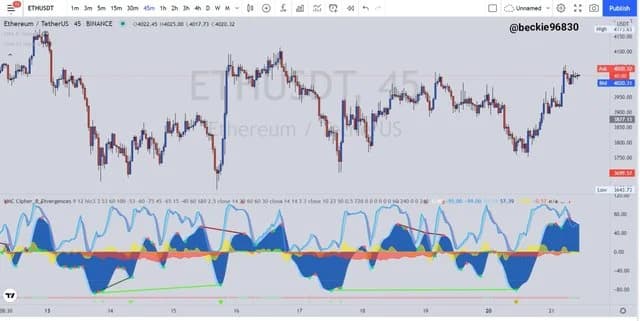
1. The Momentum Waves (WT1 & WT2)#
The two wave lines are the most prominent feature of Cipher B:
- WT1 (leading wave) — the faster, lighter-colored line
- WT2 (lagging wave) — the slower, darker-colored line
How to interpret them:
- WT1 above WT2 and rising — bullish momentum is building
- WT1 crossing below WT2 — momentum is shifting bearish
- Both waves above the zero line — the market is in a bullish phase
- Both waves below the zero line — the market is in a bearish phase
- Waves compressed and flat near zero — the market is consolidating and coiling for a bigger move
- Wide gap between WT1 and WT2 — strong momentum in the current direction
The waves also have overbought (typically above 60) and oversold (below −60) zones. Signals generated in these extreme zones carry more weight.
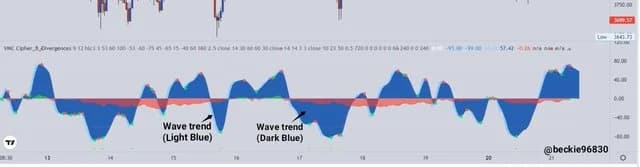
2. The Dots (Green and Red)#
Dots are the most watched signals on Cipher B:
- Green dots appear when multiple algorithms converge in oversold territory — WaveTrend crosses bullish, money flow is positive, and momentum is aligned. These are potential buy signals.
- Red dots (sometimes called "red X" marks) appear when WaveTrend crosses bearish in overbought territory. These are potential sell or short signals.
Green dots that appear deep below the zero line (in the oversold zone) are considered the highest-probability buy signals. Likewise, red dots that appear high above the zero line are the strongest sell signals.
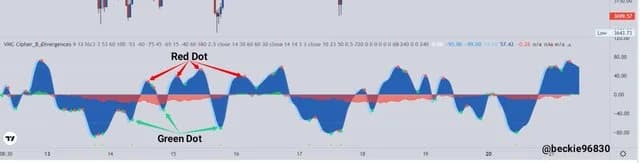
3. The Circles (Green, Red, Gold, and Purple)#
Circles refine the wave crossover information:
- Small green/red circles — simple WaveTrend crossovers. These are basic directional cues and occur frequently.
- Large green circles — WaveTrend bullish crossover happening inside the oversold zone, suggesting a potential reversal to the upside.
- Large red circles — WaveTrend bearish crossover inside the overbought zone, suggesting a reversal to the downside.
- Gold/orange circles — a bullish signal that appears after strong bullish divergence in extreme oversold conditions. These are noteworthy but should be confirmed with other factors.
- Purple triangles — divergences confirmed by WaveTrend crossovers at overbought or oversold levels, indicating a stronger potential reversal.
4. Divergence Lines#
Cipher B draws divergence lines directly on the oscillator panel:
- Bullish divergence — price makes a lower low, but the indicator makes a higher low. This suggests selling pressure is weakening and a bounce may follow.
- Bearish divergence — price makes a higher high, but the indicator makes a lower high. This suggests buying pressure is fading and a drop may follow.
- Hidden bullish divergence — price makes a higher low while the indicator makes a lower low, suggesting the existing uptrend will continue.
- Hidden bearish divergence — price makes a lower high while the indicator makes a higher high, suggesting the existing downtrend will continue.
Divergences on higher timeframes (4H, daily) are generally more reliable than those on lower timeframes.
5. The Money Flow Histogram#
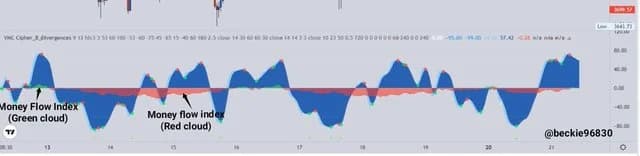
The colored area behind the waves represents the Money Flow Index:
- Green histogram — net buying pressure; money is flowing into the asset
- Red histogram — net selling pressure; money is flowing out
When the money flow aligns with the wave direction and dot signals, the overall signal is stronger. For example, a green dot appearing with green money flow is a higher-confidence buy than a green dot appearing during red money flow.
Bullish Setups#
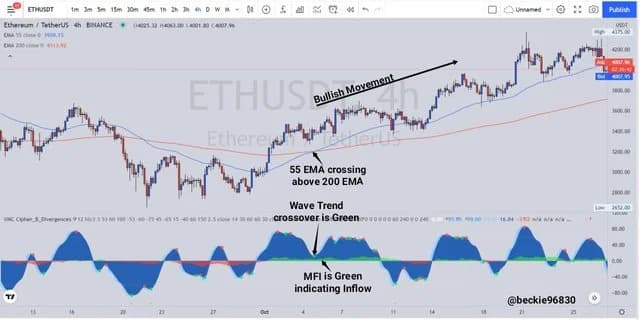
Here are the most common bullish patterns traders look for with Cipher B:
The Classic Green Dot Reversal#
- Waves (WT1 and WT2) are deep in the oversold zone (below −60).
- A green dot appears, indicating a multi-algorithm bullish convergence.
- Money flow histogram shifts from red to green.
- Entry: On the candle following the green dot.
- Stop-loss: Below the recent swing low.
- Target: The next resistance level, or when a red dot or bearish crossover appears.
Bullish Divergence + Wave Cross#
- Price prints a lower low, but the Cipher B waves print a higher low — a bullish divergence line appears.
- WT1 crosses above WT2, confirming momentum shift.
- A green or gold circle may appear to reinforce the signal.
- Entry: On the WaveTrend crossover after divergence confirmation.
- Stop-loss: Below the divergence low.
Zero-Line Reclaim#
- Waves have been below zero (bearish phase) and begin curling upward.
- WT1 crosses above the zero line with WT2 following.
- Money flow is green or turning green.
- Entry: When both waves are above zero and WT1 > WT2.
- This setup works well in trending markets where pullbacks to the zero line offer re-entry opportunities.
Bearish Setups#
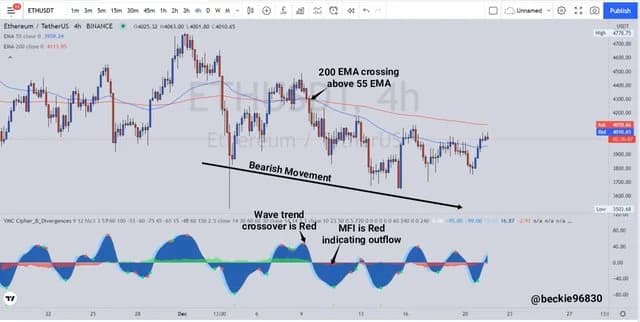
The Red Dot Rejection#
- Waves are in the overbought zone (above 60).
- A red dot appears, signaling a bearish crossover with multi-indicator alignment.
- Money flow shifts from green to red.
- Entry (short or exit long): On the candle following the red dot.
- Stop-loss: Above the recent swing high.
Bearish Divergence + Wave Cross#
- Price makes a higher high, but Cipher B waves make a lower high — a bearish divergence line appears.
- WT1 crosses below WT2, confirming the momentum shift.
- A red circle or purple triangle may appear for extra confirmation.
- Entry (short or exit long): On the WaveTrend crossover after divergence confirmation.
Overbought Rejection at Resistance#
- Price approaches a known resistance level.
- Waves are in the overbought zone and begin flattening or curling downward.
- A red dot or large red circle appears.
- Money flow shifts red.
- This is particularly strong when the divergence coincides with a resistance level on the price chart.
Combining Cipher B with Other Indicators#
Cipher B is powerful on its own, but pairing it with complementary tools reduces false signals:
Cipher B + RSI#
Even though RSI is baked into Cipher B's calculations, adding a standalone RSI (14-period) on your chart provides a clean second confirmation. Look for:
- Cipher B green dot + RSI below 30 → strong oversold confluence
- Cipher B red dot + RSI above 70 → strong overbought confluence
- RSI divergence that matches Cipher B divergence → very high-confidence signal
Cipher B + Volume#
Volume spikes confirm that the momentum shift identified by Cipher B has real participation behind it:
- Green dot + volume spike above average → buyers are stepping in with conviction
- Red dot + volume spike → sellers are aggressively distributing
- Green dot on low volume → the signal may lack follow-through
Cipher B + Moving Averages#
Use the 50 EMA and 200 EMA on the price chart as trend filters:
- Only take Cipher B buy signals when price is above the 200 EMA (long-term uptrend)
- Only take Cipher B sell signals when price is below the 200 EMA (long-term downtrend)
- The 50/200 EMA crossover ("golden cross" / "death cross") combined with Cipher B wave direction gives a macro-level confirmation
Cipher B + Support/Resistance Levels#
Cipher B signals that appear at key price structure levels are the highest-probability setups:
- Green dot at a major support level → strong long entry
- Red dot at a major resistance level → strong short or exit signal
- Divergence at a range boundary → potential breakout or reversal
How to Use VuManChu Cipher B on Gainium#
While Gainium doesn't display Cipher B directly on its interface, you can fully automate Cipher B signals using the TradingView-to-Gainium webhook pipeline:
Step 1: Set Up the Indicator on TradingView#
Add VuManChu Cipher B + Divergences to your chart on TradingView and configure the settings for your preferred timeframe and asset.
Step 2: Create TradingView Alerts#
- Right-click on the Cipher B indicator and select Add Alert.
- Choose the specific condition you want to trade on (e.g., "Green dot appeared," "WT cross up in oversold zone").
- Set the alert to trigger a webhook and paste your Gainium bot's webhook URL.
- In the alert message, use the JSON payload format that Gainium expects. For example:
{"action": "open_deal"}
You can also concatenate multiple actions in a single alert by sending an array. See the Gainium webhook documentation for payload details.
Step 3: Configure Your Gainium Bot#
- Create a new DCA bot or combo bot on Gainium.
- Set the deal start condition to Webhook.
- The bot will now listen for incoming webhooks from your TradingView Cipher B alerts.
- Configure your take-profit, stop-loss, and safety order settings as you normally would.
Step 4: Paper Trade First#
Before going live, use Gainium's paper trading mode to forward-test your Cipher B strategy with real market data and zero risk. This lets you validate signal quality and bot configuration before committing capital.
Using the Gainium Screener#
The Gainium Screener browser extension helps you identify which crypto pairs are showing the strongest setups. While the screener uses its own set of built-in metrics, you can combine its filters (e.g., volume spikes, RSI extremes, ATH drawdown) with Cipher B analysis on TradingView to narrow down the best trading candidates.
Tips for Getting the Most Out of Cipher B#
- Start on higher timeframes. The 4H and daily charts produce the most reliable signals. Lower timeframes generate more noise and false positives.
- Don't trade every dot. Green and red dots are suggestions, not orders. Wait for confluence with money flow, divergence, and price structure before entering.
- Respect the overbought/oversold zones. Signals in the extreme zones (above 60 or below −60) are significantly more reliable than those near the zero line.
- Watch the money flow. A dot signal without supporting money flow is weaker. Alignment between dots, wave direction, and money flow histogram is what separates good entries from mediocre ones.
- Adjust settings per timeframe. The default WaveTrend channel length (9) and average length (12) are tuned for 4H. If you trade on 1H or 15M, experiment with shorter lengths.
- Combine with price action. Cipher B tells you about momentum and money flow. Price action (support/resistance, trend lines, candlestick patterns) tells you about structure. The best trades are where both agree.
- No indicator is infallible. Cipher B will produce false signals, especially in choppy, low-volume markets. Always use a stop-loss and manage position size accordingly.
Conclusion#
VuManChu Cipher B packs an impressive amount of information into a single oscillator — momentum waves, buy/sell dots, divergence lines, money flow, and pattern confirmations. Once you learn to read its visual language, it becomes a powerful lens for spotting high-probability entries and exits across crypto markets.
The key is not to use it in isolation. Combine Cipher B signals with volume analysis, support/resistance levels, and trend filters for the strongest setups. And when you're ready to automate, connect your TradingView alerts to Gainium's webhook-powered bots so your strategy runs around the clock — even while you sleep.
Start with paper trading on Gainium to test your Cipher B setups risk-free, then scale into live trading once you've validated your edge.
About Ares Sanchez
• Captain of the ship at gainium.ioI am the founder of Ganium.io, a cryptocurrency bot platform. I'm also an avid meditator and fitness and health enthusiast. In my spare time, I like to code small utilities that do work for me, so I never have to work again. Despite being what some would call a "serial procrastinator", I have some unique talents that have served me well in life. For example, I can always put the USB-C connector in the right way on the first try, I'm an expert at picking things up with my toes, and I can move only one eye at will.